Create Custom Milk Box Favors with This 3-Pack Template Bundle
A Practical Solution for Party Favors and Small Business Packaging
Finding the right packaging for small gifts, party favors, or product samples can be surprisingly difficult. Standard gift bags feel generic, and custom-printed boxes often require minimum orders that don't make sense for a one-time event or a small business just starting out. The 3 Milk Box Canva Template BUNDLE offers a middle ground: a set of digital templates you can edit yourself and print at home or through a local print shop, giving you full creative control without the overhead of professional manufacturing.
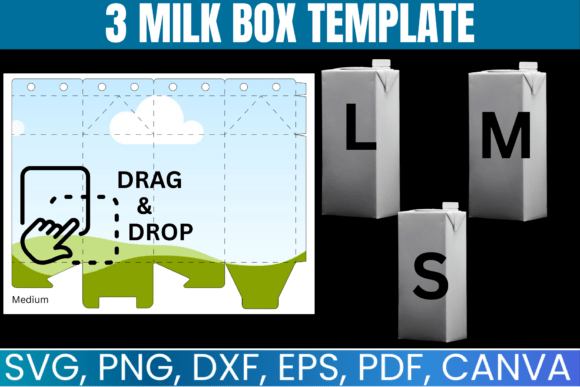
Each template in this bundle is designed around the classic milk carton shape—a tall, narrow box with a gable top that folds into a charming peaked closure. The visual style leans clean and versatile rather than overly decorative. You're working with blank canvases, essentially, which means the personality of the final box comes entirely from what you add: your color choices, patterns, text, and graphics. This makes the bundle suitable for a wide range of aesthetics, from minimalist and modern to playful and colorful.
What's Included and How the Files Work
The bundle contains three distinct milk box templates, each sized to fit a standard 8.5" x 11" sheet. After purchase, you receive instant digital access to multiple file formats:
- SVG files compatible with Cricut, Silhouette, CorelDraw, and Inkscape
- PNG files with transparent backgrounds for layering in design software
- DXF files specifically for Silhouette machines
- PDF files with solid white backgrounds for straightforward printing
- Canva links for drag-and-drop editing directly in your browser
The Canva links are particularly useful if you don't own a cutting machine or prefer not to work with vector editing software. You can open the template in Canva, customize colors and add text or graphics using Canva's built-in tools, then export a print-ready file. For those with a Cricut or Silhouette, the SVG and DXF formats let you cut the box shapes precisely, which saves time compared to cutting by hand and produces cleaner edges.
Where These Templates Fit Into Real Projects
Think about the last time you needed small, attractive packaging. Maybe it was for wedding favors, a baby shower, a holiday gathering, or sample products for a craft fair. The milk carton shape works across all of these scenarios because it's recognizable, compact, and has a built-in handle at the top. It holds small items well—candy, tea bags, small candles, lip balm, seed packets, jewelry—and the tall silhouette gives you vertical space for branding or messaging.
For small business owners, these templates solve a practical packaging design problem. If you sell handmade soaps, baked goods, or artisan products at local markets, having custom-branded packaging elevates how customers perceive your work. A well-designed milk carton box with your logo, brand colors, and a brief message looks far more intentional than a plain cellophane bag. It contributes to your brand identity in a tangible way that digital marketing alone can't replicate.
Event planners and DIY enthusiasts will find the templates equally useful. Birthday parties, bridal showers, baby showers, graduation celebrations, and seasonal holidays all call for favor boxes. Instead of buying mass-produced boxes with generic prints, you can design something that matches your event's color palette and theme exactly. Print a dozen in one sitting, fold them, fill them, and you're done.
Customizing for Visual Impact
The real value of a template bundle like this lies in customization. Because the templates are intentionally blank, you have room to apply principles of modern typography and graphic design to make each box feel intentional. Here's where design fundamentals matter:
Color and contrast set the mood. A monochromatic palette with one accent color reads as sophisticated. Bright, saturated colors feel festive. Pastels suggest softness and work well for baby showers or spring events. In Canva, you can change the fill color of each template section with a couple of clicks, so experimenting with different palettes is fast.
Typography choices affect how your message lands. If you're adding a name, date, or short phrase to the box, the font you pair with the template matters. A clean sans serif font keeps things modern and readable at small sizes. A script font or handwritten font adds warmth and personality, which works well for personal events. For small business packaging, consider how your chosen typeface aligns with your existing brand identity—consistency across your packaging, website, and social media graphics builds recognition.
Graphics and patterns can be layered onto the templates in Canva or your preferred design software. A subtle geometric pattern, a floral illustration, or a simple stripe can transform a plain white box into something that feels curated. Keep in mind that the milk carton shape has multiple panels—front, back, sides, and the gable top—so you have several surfaces to work with. Not every panel needs the same treatment. Sometimes a bold front panel with a simpler back and sides creates better visual hierarchy.
Practical Tips for Assembly and Printing
Once you've designed your box, the assembly process is straightforward. Print the template on cardstock rather than standard printer paper—cardstock holds its shape better and feels more substantial in hand. A weight between 65 lb and 110 lb works well. If you're using a cutting machine, load the SVG or DXF file and let the machine score and cut the fold lines. If you're cutting by hand, use a ruler and a bone folder or the back of a butter knife to score clean fold lines before cutting the outline.
Fold along the scored lines, apply adhesive to the designated tabs (a strong craft glue or double-sided tape both work), and press the box together. The gable top folds inward and can be left open or pinched closed. For a finished look, consider adding a ribbon, twine, or a small tag through the top handle.
If you're producing boxes in bulk for an event or business, batch the process: design all boxes at once, print all sheets at once, cut all pieces at once, then fold and assemble. This assembly-line approach is significantly faster than completing one box start to finish before moving to the next.
Evaluating Whether This Bundle Works for You
This bundle makes the most sense if you need a small to moderate quantity of custom boxes and want creative control over the design. It's less practical if you need hundreds of identical boxes and have the budget for professional printing, since the per-unit time investment of home printing and assembly adds up. But for most people searching for this type of product—crafters, small business owners, event hosts, and DIY enthusiasts—the balance of cost, flexibility, and quality hits a reasonable mark.
The inclusion of multiple file formats means you're not locked into one tool. Start in Canva if you want simplicity. Move to Inkscape or CorelDraw if you need more advanced vector editing. Use the SVG with your cutting machine for precision cuts. This flexibility is what separates a useful design asset from a limiting one.
Since this is a digital product with lifetime access after a single purchase, you can revisit the templates for future projects without buying again. A template you used for a birthday party favor box this month can be repurposed next quarter for holiday gift packaging or product samples at a trade show. That kind of reuse makes the investment worthwhile over time.
Ultimately, the 3 Milk Box Canva Template BUNDLE is a straightforward tool for a specific need. It won't solve every packaging challenge, but for creating charming, customizable milk carton boxes at home, it provides exactly what you need to get started—and enough flexibility to make the result feel genuinely yours.